Face the window—free light for a talking-head video
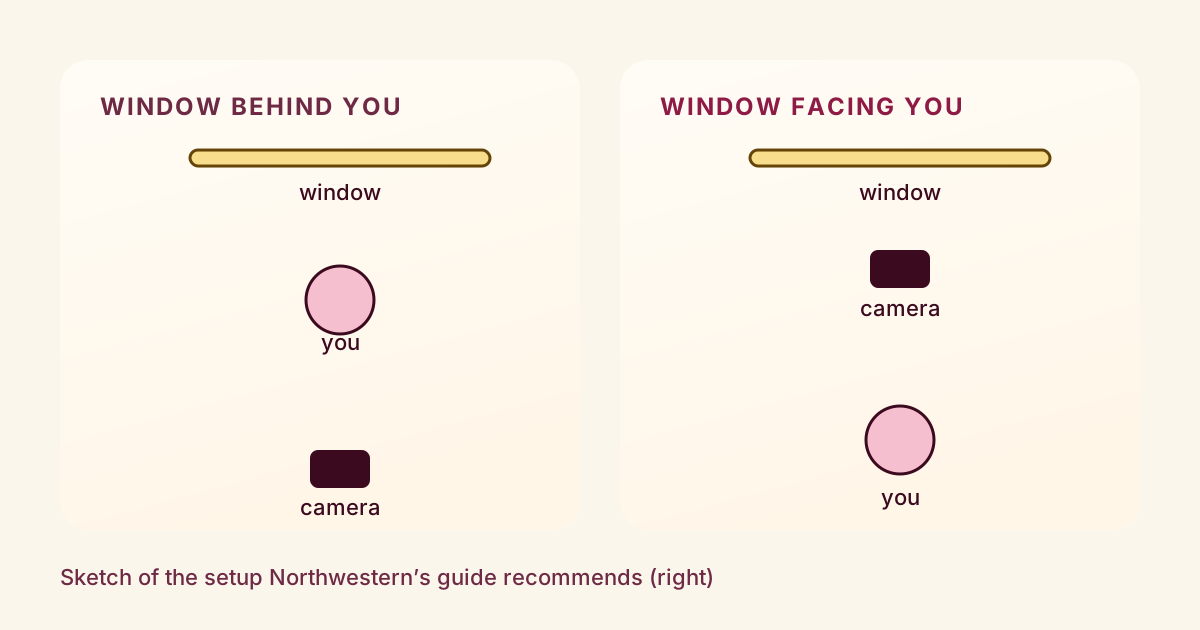
If you film near a window, the most useful thing to check is which way you are facing. Northwestern’s guide to recording yourself on video says to position yourself so windows or your main light sources face you, not sit behind you.¹ Put the camera between you and the window and you have a free, soft light on your face.
That is the whole idea. The rest of this post is about making it work on an ordinary afternoon.
Why the window goes in front
When the window is behind you, it is the brightest thing in the shot and your face is lit from the wrong side. Northwestern’s guide says to avoid that setup, so it is worth a quick test of your own: shoot ten seconds each way and compare how your face looks.¹
The same Northwestern guide also suggests daylight when you can get it, and says to avoid overhead lighting.
Soften it and fill the shadows
A bigger light source gives softer light, according to Adobe’s lighting tips for stock video makers. A window is a large source, which is why it flatters faces.²
If the light is harsh, Adobe suggests two things. One is shooting in indirect daylight, meaning a spot the sun is not hitting directly. The other is softening it with a scrim, a diffusing sheet.² A white bedsheet or a sheer curtain over the glass is the same idea at home. Keep fabric away from hot lamps.
For the side of your face that stays darker, Adobe suggests bouncing light back into the shadows with a reflector or a white sheet.² A white board, a sheet of poster board or a light wall beside the camera works the same way. Hold it just out of frame on the shadow side and watch your face in the preview as you move it.
One note on the source: Adobe’s page is written for stock footage and also describes a three-point setup that uses a window behind the subject with lamps in front. If you have only a window, facing it is the simpler setup, and it is the one Northwestern recommends for self-recording.¹
Check what is behind you
Northwestern recommends a plain background and says to avoid windows, readable signs, other people and trash cans in the frame.¹ If your only window is also your light, face it and let it sit behind the camera, so it never appears in the shot.
Shoot it in one sitting
Natural light is not consistent. Adobe says weather changes and the progress of the day can throw off both exposure and color balance.² If you record a line, then come back an hour later for another, the two clips may not match when you cut them together. Plan to record everything for one video in a single session, and check the forecast if the shoot matters.
What this does not cover
Neither source says how much brighter or softer your video will look, and nothing here promises that better light changes how a video performs. It makes your face easier to see. That is the claim, and it is a modest one.
Notes & References
- Tips for Recording Yourself on Video. Northwestern University Student Affairs Marketing. Sections on lighting, background and camera position. Accessed October 6, 2026. {#ref-1} ↩
- Basic lighting tips for amazing stock footage. Adobe Stock Contributor Help. Sections “Keep it simple with natural lighting” and “Try the classic three-point setup.” Accessed October 6, 2026. {#ref-2} ↩
What to do next
- Turn so the window is in front of you and the camera sits between you and it, not behind you.
- Soften harsh sun with a white sheet or by moving to indirect daylight.
- Hold a white sheet or board on the shadow side to bounce light back onto your face.
- Keep the window and other distractions out of the background behind you.
- Record the whole video in one sitting, since daylight changes with weather and time of day.
Want to know how a draft will come across before you post it? Three AI viewers watch it and tell you where they’d have left, with notes that jump to the exact moment.
Try a video nowSources
- Tips for Recording Yourself on Video (Northwestern University Student Affairs Marketing) checked October 6, 2026
- Basic lighting tips for amazing stock footage (Adobe Stock Contributor) checked October 6, 2026
Something wrong? Tell us and we’ll fix it and note the change.